
Jefferson County Arrest to Court Records
After a Jefferson County jail arrest, the jail intake record is only the custody side of the event. Court records appear when the case is filed with the correct court. The sheriff's Detective Division page says case files are submitted to the Jefferson County Prosecutor's Office for review and prosecution when appropriate. That review can lead to filed charges that differ from the booking allegation.
The pathway often looks like this: arrest, jail booking, first appearance, prosecutor review, formal charging document, court case number, hearings, bond decisions, and disposition. If the person was just booked, the adult jail may confirm custody before the court portal has a case entry. If the case is already filed, the court portal and Clerk of Courts become the main source for charge status.
Jefferson County Court Records Search
The official Jefferson County case lookup and payments page routes users to the court systems used for public case lookup. Common Pleas matters use the county-linked Common Pleas eServices portal. Wintersville, Toronto, and Dillonvale county court matters use a separate county-court eServices portal. The Clerk of Courts also links public case lookup, public-records requests, and older indexed records.
| Court Path | Use It For | Official Lookup |
|---|---|---|
| Common Pleas | Felony-level criminal cases, serious charges, and Common Pleas filings. | Common Pleas eServices |
| Wintersville County Court | County-court misdemeanor, traffic, and preliminary matters where assigned. | County Court eServices |
| Toronto County Court | County-court matters routed through the Toronto division. | County Court eServices |
| Dillonvale County Court | County-court matters routed through the Dillonvale division. | County Court eServices |
Lookup Court Records After Arrest
A clean search starts with the arrest date, exact name, date of birth if available, arresting agency, and any case number. Court portals can lag behind jail booking. When the arrest is very fresh, start with the jail for custody and then return to the case lookup page after filing.
- Use the county case lookup landing page to choose Common Pleas or county court.
- Search Common Pleas for felony charges, grand jury indictments, and serious criminal cases.
- Search the county-court eServices portal for Wintersville, Toronto, and Dillonvale matters.
- Contact the Clerk Legal Division at 740-283-8583 if spelling, case number, older records, or portal access blocks the search.
- If charges have not appeared, ask the jail or arresting agency whether the matter has been submitted for filing.
For custody status rather than court filings, use Jefferson County jail inmate records and the adult jail phone line.
Jefferson County Court Search Fields
The research captured the official routing buttons from the county landing page. The internal eServices fields require a JavaScript/session handshake, so exact internal name or case-number labels should not be invented. Treat the landing page as the verified public entry point.
| Field Label | Type | Required | Notes |
|---|---|---|---|
| Common Pleas | Button/link | Optional | Opens the Common Pleas case lookup and payment portal. |
| Wintersville Court | Button/link | Optional | Routes to the county-court eServices portal. |
| Toronto Court | Button/link | Optional | Routes to the county-court eServices portal. |
| Dillonvale Court | Button/link | Optional | Routes to the county-court eServices portal. |
| Search fields inside eServices | Not fully captured | Unspecified | Do not assume field names without using the live portal. |
Jefferson County Charging Records
Court records after a jail arrest often turn on the charging document. A booking entry may describe an arrest allegation. A complaint, information, or indictment is a court filing. The prosecutor may file, amend, reduce, dismiss, or decline charges after reviewing law-enforcement reports.
| Document | What It Means | Why It Matters |
|---|---|---|
| Complaint | Often starts a criminal case based on law-enforcement or prosecutor allegations. | May be the first formal charge visible after arrest. |
| Information | A formal charging document used in some felony contexts when indictment is waived or not required. | Can replace an indictment path in eligible cases. |
| Indictment | A grand-jury charging document for felony prosecution. | Can add or change counts after the booking stage. |
Jefferson County Charge Status
A charge is not a conviction. It is an allegation or filed count until the court reaches a final result. The court record after an arrest can show whether a count is pending, amended, reduced, dismissed, or disposed. That distinction is important for background checks, employment questions, tenant screening, and personal record review.
| Status | Plain Meaning |
|---|---|
| Pending | The case or charge remains open. |
| Amended | The prosecutor or court process changed the charge. |
| Reduced | The charge changed to a lesser offense. |
| Dismissed | The charge ended without conviction. |
| Nolle prosequi | The prosecutor declined to proceed on that charge. |
| Disposed | The case or charge has a final outcome. |
| Conviction | A finding or plea of guilt, not the same as an arrest. |
Jefferson County Bond Records
Bond is set by court process, not by a public jail roster. ORC 2937.011 requires release on the least restrictive conditions that will reasonably assure appearance, protect safety, and prevent obstruction unless detention is ordered after required process. ORC 2937.22 defines bail as security for appearance and lists forms such as cash, bonds, and recognizance.
Jefferson County local rules state that eligible misdemeanor defendants may post bail under schedule by surety bond, real estate or securities as allowed, or cash deposit. The adult jail page does not publish a bond kiosk, online bond vendor, or accepted jail payment list. Call the adult jail or the relevant court before trying to post bond.
Jefferson County Arrest Warrants
No official Jefferson County sheriff active-warrant search or most-wanted list was located in the official sources reviewed. That means warrant research should stay with courts, sheriff phone channels, clerk records, and counsel where needed. Unofficial warrant aggregators should not be treated as the county source.
| Warrant Type | Record Link to Jail Arrest |
|---|---|
| Arrest warrant | Can lead to booking after a criminal complaint or charge. |
| Bench warrant | Often issued after failure to appear or court-order violation. |
| Fugitive or out-of-county hold | May keep a person in custody pending transport or another court action. |
| Probation or parole holder | Can block release even when a local bond is posted. |
Jefferson County Prosecutor Records
Ohio uses county prosecuting attorneys rather than district attorneys. Jefferson County's prosecuting attorney is Jane M. Hanlin. Public sources list the prosecutor's office at 104 N. Third St, Steubenville, OH 43952, with phone 740-283-1966. The prosecutor's role after a jail arrest is to review law-enforcement reports, decide what charges to pursue, handle prosecution, and present felony matters to a grand jury where needed.
The prosecutor is separate from the sheriff and the Clerk of Courts. The sheriff handles jail custody and jail records. The clerk maintains filed court records. The prosecutor handles charging and prosecution decisions. A person tracking court records after arrest may need all three sources at different points.
Jefferson County Sealed Records
Ohio sealing and expungement rules can affect later public access to court records after a jail arrest. Sealing limits public access to an eligible record. Expungement is a statutory process that can destroy, delete, or seal eligible official records. ORC 2953.32 governs applications and exclusions. Eligibility depends on the record, outcome, timing, and statutory limits.
| Term | Meaning | Public Search Effect |
|---|---|---|
| Sealed | Access is limited by court order under Ohio law. | Public portals may hide or restrict the record. |
| Expunged | Eligible records may be destroyed, deleted, or sealed under statute. | Public access can be removed or sharply limited. |
| Not eligible | Some records and offenses are excluded or require waiting periods. | The public court record may remain available. |
Jefferson County Court Portals
The county case lookup landing page is the official routing point for court records after a jail arrest.
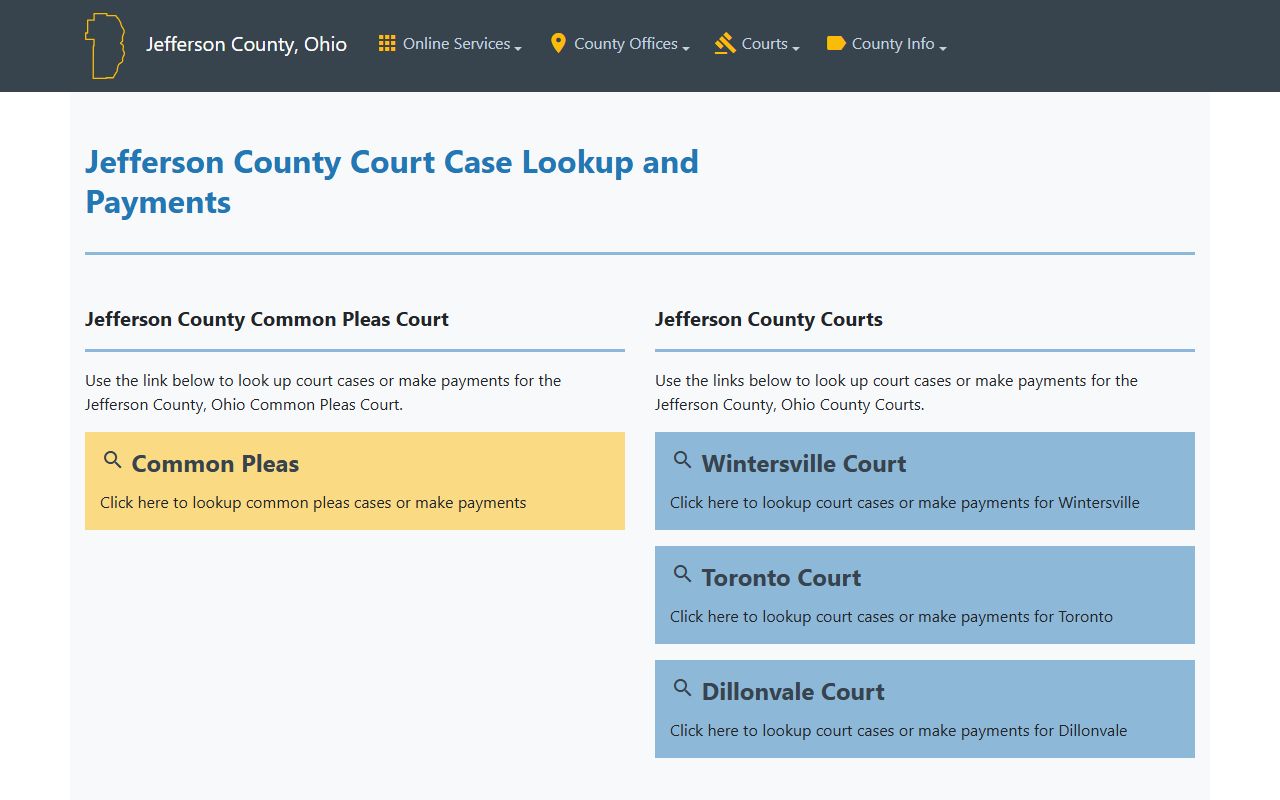
The landing page matters because it separates Common Pleas from the county-court portals instead of sending every arrest-related search to one place.
The Common Pleas eServices portal is the county-linked portal for Common Pleas records.
Common Pleas is the expected path for felony-level records and serious criminal filings after a Jefferson County arrest.
Public Record Search
Sponsored Results